My 96 GB Mac Studio still hit a memory warning
A real Mac Studio memory warning stopped parallel AI work. The dialog reported 625.49 GB for two apps; here is what the screenshots prove.
TL;DR
- My 2025 Mac Studio has an Apple M3 Ultra and 96 GB of memory.
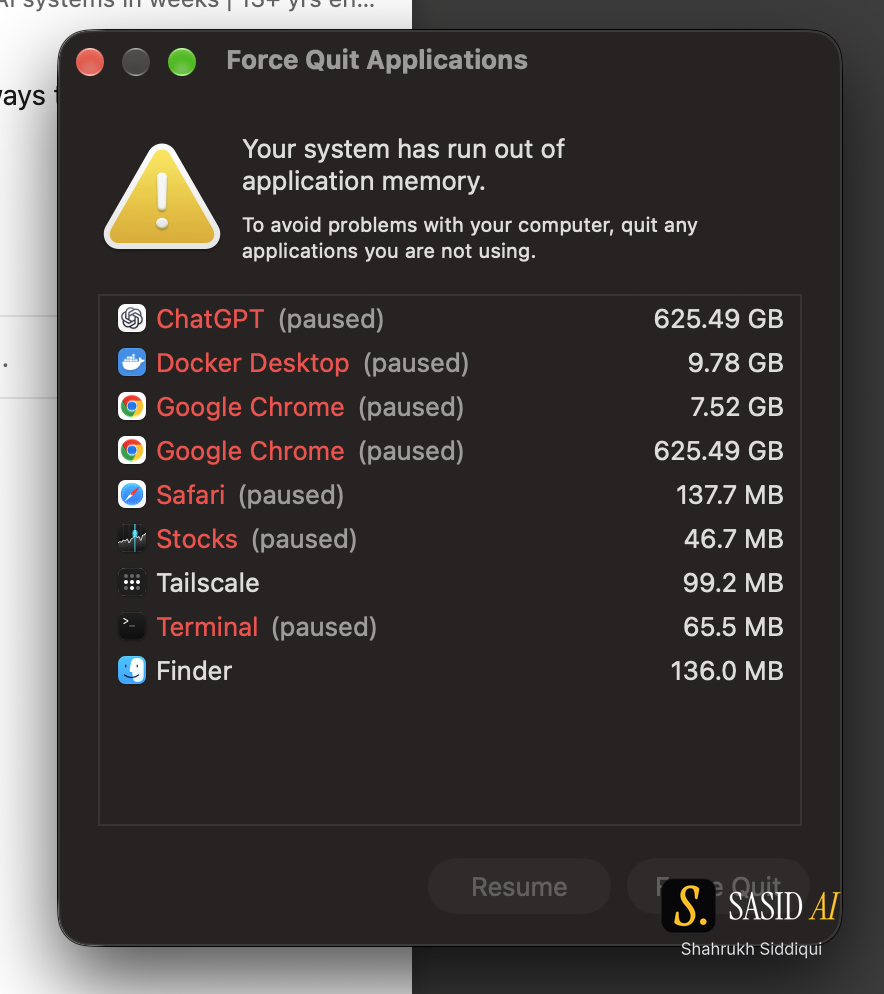
- During ChatGPT and Codex work with Chrome open, macOS stopped the setup with “Your system has run out of application memory.”
- The dialog reported 625.49 GB for ChatGPT and the same value for one Chrome entry. Those are dialog-reported figures, not physical RAM measurements or a root-cause diagnosis.
- Reliable agent work needs a recovery path for machine limits as well as provider limits.
I bought the Mac Studio so my agents and parallel projects could keep running in the background while I managed them from my MacBook. I wanted more room to work and fewer interruptions. On October 8, 2026, that setup stopped during my ChatGPT and Codex work with Chrome open.
The first screenshot is a real macOS warning: “Your system has run out of application memory.” It lists ChatGPT at 625.49 GB and one Chrome entry at 625.49 GB. The second screenshot is About This Mac. It shows a 2025 Mac Studio, Apple M3 Ultra and 96 GB memory.
The numbers need careful wording. The 625.49 GB values are what the dialog reported. They are not a measurement of physical RAM, and the screenshots do not identify the root cause. The warning names ChatGPT; it does not identify a separate Codex process. I am describing an interruption, not diagnosing a leak or provider behavior.
The machine is part of the agent route
When an agent runs locally, the route includes the terminal, browser, filesystem, network, model service and machine resources. A provider quota can be healthy while the browser or local process fails. A larger model cannot recover a task that lost its working folder or was interrupted before it saved the output.
That makes resource state part of the handoff. Before I close the MacBook or move work to another machine, I want to know:
- what task is active;
- which files or artifacts are already saved;
- which model and route are running;
- what check must run after recovery;
- whether another approved route can continue the work.
The task should not depend on an open browser tab or an agent's memory of an unsaved result. Save the last verified output and the next safe action. If the machine fails, a person can restart from state instead of guessing what was lost.
Separate account limits from local limits
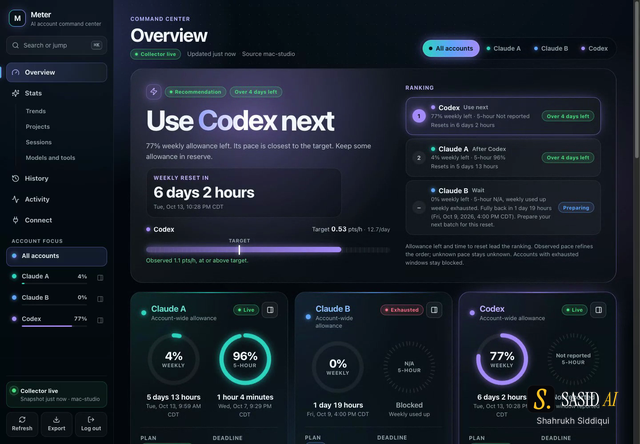
I also track AI subscriptions, so I care about provider resets and local resource exhaustion as two different signals. Meter keeps account allowances and reset dates beside local model, project and helper-agent history. A low quota is an account fact. A memory warning is a machine observation. Neither one should be rewritten as the other.
The distinction helps with routing. If an account is near its reset or allowance, another approved provider may be appropriate. If the Mac is under pressure, changing providers may not help. The safe choice could be to stop new work, save state and recover the machine first.
Design recovery before the failure
For long tasks, I would use a small recovery contract:
- Write the goal and acceptance check before starting.
- Save meaningful outputs after each completed stage.
- Record the last route and model identifier.
- Keep failed attempts and timeouts visible.
- Ask for approval before restarting with a broader scope.
An agent system can then show whether the final result is verified, unverified or missing. Agent's receipt model follows this principle: actual output and current checks are sealed with route, time and qualified cost, while source records for runs and artifacts remain separate. If the evidence is stale, the status stays Unverified.
The receipt cannot prevent a memory warning. It can reduce the cost of recovering from one.
What I will inspect next
I will look at the process state, browser tabs, saved task outputs and the exact point where work stopped. I will not infer a cause from two dialog values. I will also test whether a smaller active set, a fresh browser session or a different route changes the failure. Those are future checks, not results from these screenshots.
The broader lesson is simple: agent reliability has at least two clocks. One is the provider's allowance and reset window. The other is the machine's ability to keep the route alive. A workflow that records only model calls misses the second clock.
Sources and related reading
The source event is my October 8 LinkedIn post. The attached screenshots are native owner captures; the serial number remains redacted. The post does not claim that 96 GB is Apple's maximum configuration.
- How to measure AI subscriptions across accounts and machines
- Your AI agent says it is done. Is it?
- Claude vs Codex: a personal AI workflow decision
- SASID service companion: Mac Studio memory and AI work
If a task must survive a machine interruption, start with the Agent receipt example and decide what output and checks need to be saved.